🚀 RN Apprenticeship Time Tracker
Streamline flex time management for the RN Apprenticeship Program
Feature GuideOverview
⚠️ Important Disclaimer: This is an unofficial helper tool. Always verify your time entries against MyTime and Trajecsys before finalizing payroll submissions. The app is designed to assist tracking but is not a substitute for official payroll systems.
The RN Apprenticeship Time Tracker is a mobile-optimized web application designed to simplify flex time tracking for nursing apprentices. Built with ease-of-use and accuracy in mind, it helps apprentices stay on track with program requirements while providing leadership with transparent oversight.
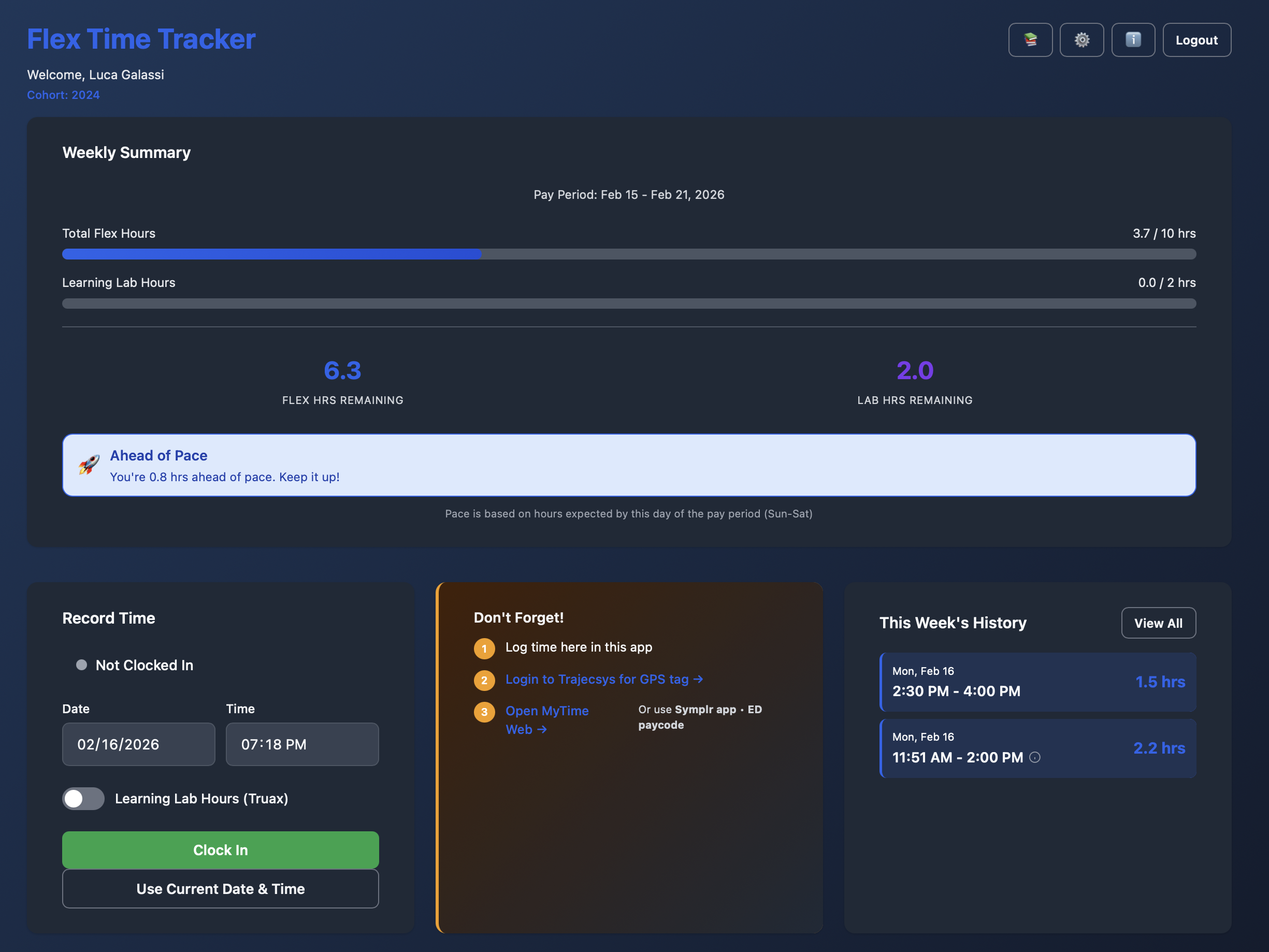
Clock in/out interface with weekly progress tracking
Key Features
Smart Time Tracking
Clock in and out with automatic payroll rounding (6-minute increments). The system automatically calculates hours and applies UW Health's payroll rules for accurate time reporting.
Intelligent Clock-Out Recommendations
When clocked in, the app shows optimal clock-out times with payroll rounding ranges. Get recommendations for completing all flex hours, meeting lab requirements, or hitting daily targets.
Real-Time Progress Tracking
Visual progress bars show weekly completion status for both flex hours and lab requirements. Color-coded indicators update instantly as you track hours, giving immediate feedback & time tracking before punches are officially approved and reflected in Trajecsys & MyTime timecards.
Customizable Pace Settings
Apprentices can set their own weekly schedule while staying within cohort guidelines. Distribute hours across the week according to personal flex schedules without affecting program requirements.
Learning Lab Toggle
Separate tracking for Truax Learning Lab hours with dedicated progress indicators. Ensures apprentices meet the 2-hour weekly lab requirement. (if required in cohort settings)
Mobile-First Design
Optimized for smartphones with touch-friendly controls, safe area support for notched displays, and works great on tablets and desktops too.
Self-Service Signup
Apprentices can create their own accounts and select their cohort during signup. No admin intervention needed to get started.
History & Analytics
View current week entries and all-time history. Apprentices can track their time patterns and ensure accurate MyTime submissions.
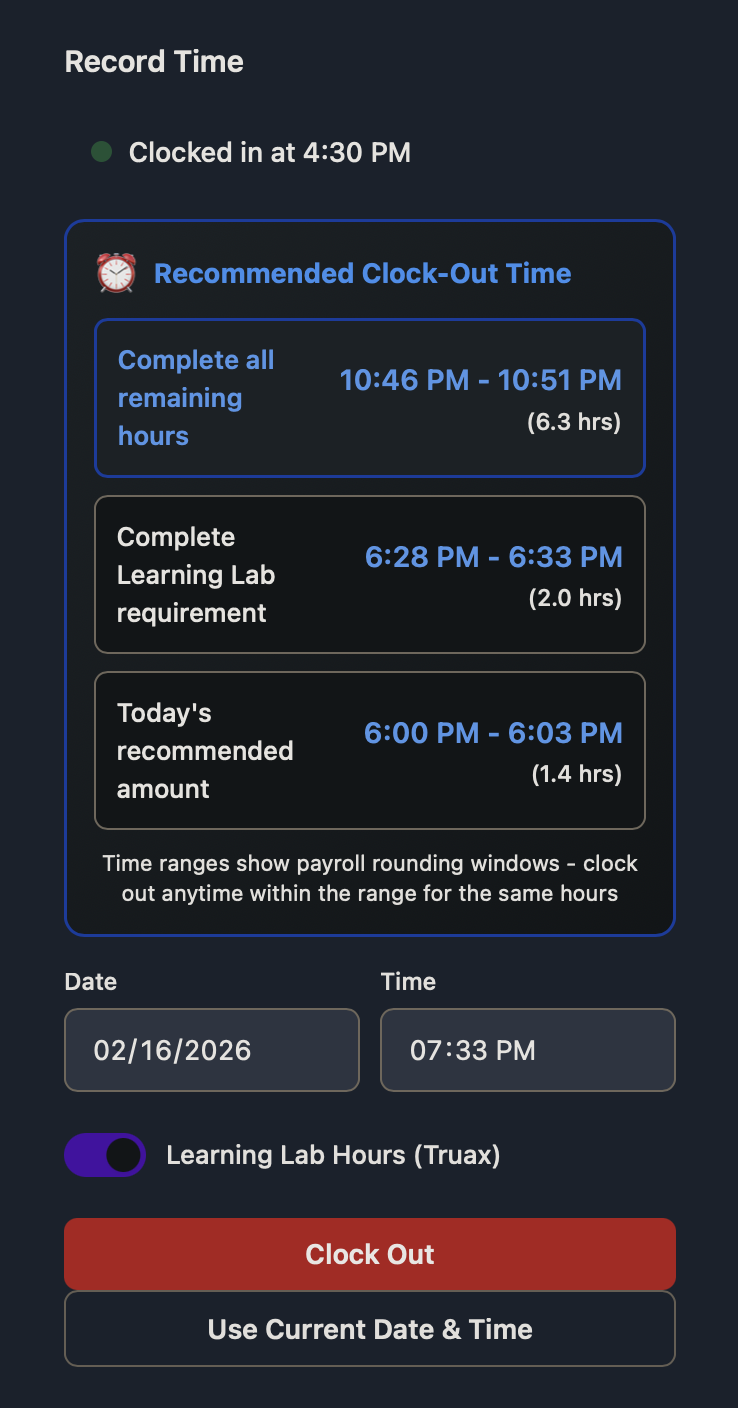
Clock-out recommendations with custom pace settings
Real-World Use Cases
Scenario 1: Regular Flex Study
Sarah clocks in at 6:00 PM to study course materials. The app recommends clocking out at 8:30 PM (range: 8:28-8:33) to complete 2.5 hours after rounding. She reviews her weekly progress showing 7.5/10 hours completed.
Scenario 2: Truax Learning Lab
Mike arrives at Truax at 9:00 AM, clocks in with "Learning Lab" toggled ON. After 2 hours of hands-on practice, he clocks out. The app tracks this separately toward his 2-hour lab requirement.
Scenario 3: Custom Flex Schedule
Emma works 12-hour shifts Tue/Wed/Thu. She customizes her pace to expect 0 hours on her working days (Tue/Wed/Thu) and distributes her flex time across her off days (Sun/Mon/Fri/Sat). Pace indicators adjust to her schedule while she completes her required 10-hour weekly total on her days off the unit.
Scenario 4: Leadership Review
Program director logs into admin panel, views all apprentice time entries for the week, identifies at-risk apprentices falling behind, and exports month-end CSV/Excel workbook for reporting.
How It Works
For Apprentices:
- Sign Up: Create an account and select your cohort
- Clock In: Start tracking time when you begin flex work or lab time
- Monitor Progress: View real-time progress on your weekly requirements
- Get Recommendations: See optimal clock-out times to meet goals
- Clock Out: End your session with automatic time calculations
- Review History: Check past entries and verify MyTime submissions
- Customize Schedule: Set your preferred weekly pace (optional)
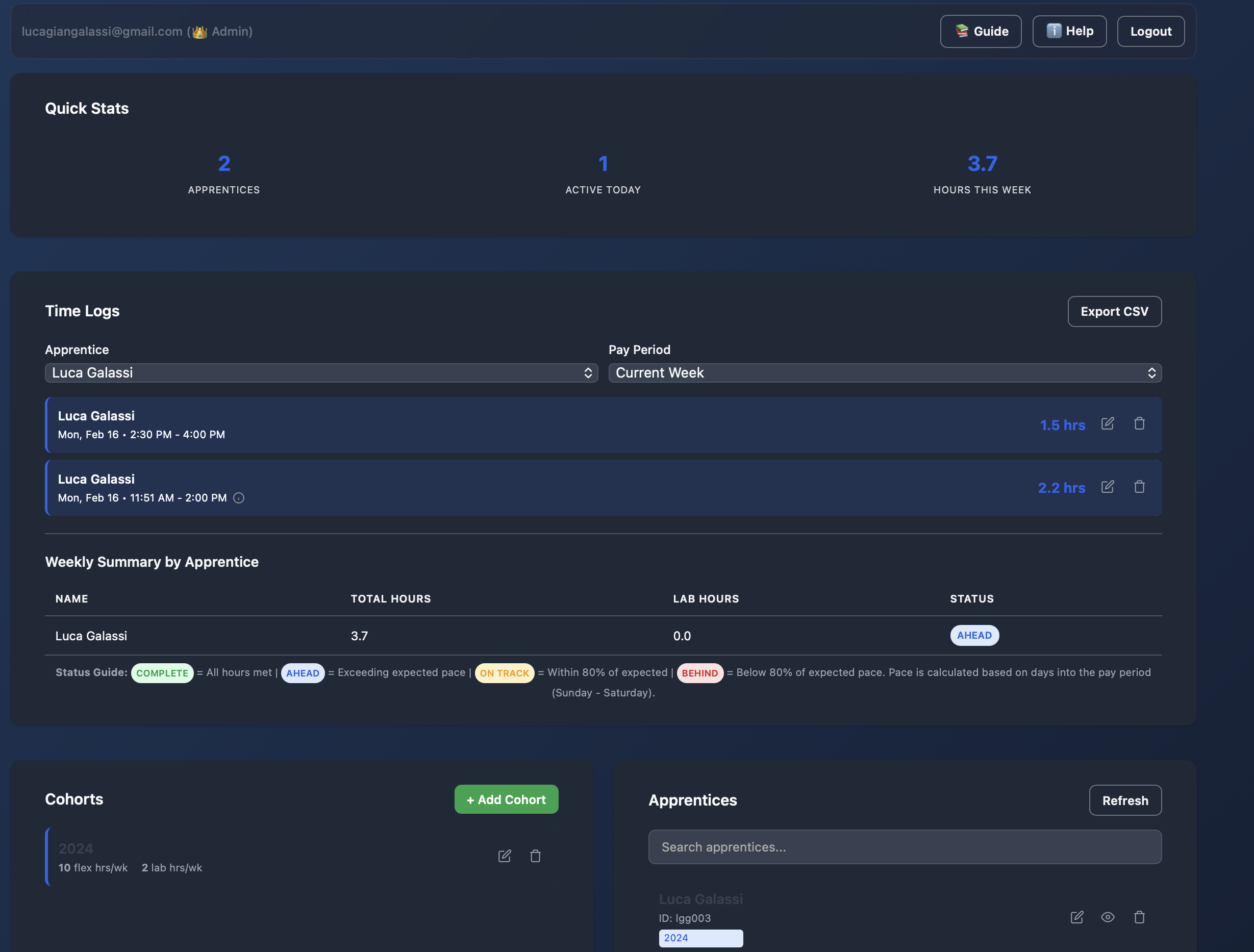
Admin panel overview
For Administrators:
- Access Admin Panel: Login by clicking the "Admin Panel" link on the signin page
- Manage Cohorts: Create cohorts with custom hour requirements
- Monitor Apprentices: View all time entries across the program
- Export Data: Generate CSV reports for compliance and analysis
- Add Users: Create apprentice accounts when needed
Benefits for Apprentices
Stay Compliant
Never miss program requirements with real-time tracking and visual progress indicators
Save Time
Quick clock in/out with automatic calculations - no manual math required
Flexible Scheduling
Customize your weekly pace while meeting cohort totals
Accuracy
Payroll rounding built-in helps align with MyTime submissions
Benefits for Leadership
Oversight
Admin panel provides complete visibility into all apprentice time entries
Reports
Export time data to CSV for analysis, compliance, and comparison against MyTime & Trajecsys.
Cohort Management
Create and manage multiple cohorts with custom hour requirements
Secure
Role-based access with separate admin authentication
Technical Specifications
System Requirements
| Platform | Web-based (works on all devices) |
|---|---|
| Browser Support | Chrome, Safari, Firefox, Edge (modern versions) |
| Mobile Support | iOS 12+, Android 8+ |
| Internet Required | Yes (with offline persistence support) |
| Installation | None required - access via web browser |
Key Technologies
Program Requirements
| Flex Hours | 10 hours per week (configurable per cohort) |
|---|---|
| Lab Hours | 2 hours per week at Truax Learning Lab (configurable per cohort) |
| Pay Period | Sunday to Sunday (weekly cycle) |
| Rounding Rules | 6-minute increments per UW Health payroll |
Payroll Rounding System
The app automatically applies UW Health's 6-minute payroll rounding rules, ensuring accurate time reporting:
| Minutes | Rounds To | Decimal Hours |
|---|---|---|
| :58 - :03 | :00 | 0.0 |
| :04 - :09 | :06 | 0.1 |
| :10 - :15 | :12 | 0.2 |
| :16 - :21 | :18 | 0.3 |
| :22 - :27 | :24 | 0.4 |
| :28 - :33 | :30 | 0.5 |
| :34 - :39 | :36 | 0.6 |
| :40 - :45 | :42 | 0.7 |
| :46 - :51 | :48 | 0.8 |
| :52 - :57 | :54 | 0.9 |
Security & Privacy
Secure Authentication
Separate admin authentication with role-based access control. Apprentices use secure login with persistent sessions.
Cloud Database Security
Firebase Firestore with security rules ensuring data integrity. Only authenticated admins can modify system settings.
Local Data Persistence
Offline support with local caching for reliability. Data syncs automatically when connection is restored.
Data Handling
What Data Is Stored: Your name, email, cohort assignment, and time entry records (clock in/out timestamps, hours logged, learning lab status). No payment information or sensitive health data is stored in this system.
Who Can Access Your Data: Only you and authorized program administrators can view your time entries. Administrators can see all apprentice data for cohort management and reporting purposes.
Data Security: All data is encrypted in transit and at rest using Firebase Firestore. Access requires secure authentication. We do not share data with third parties.
Questions or feedback?
Contact program leadership for Flex Time related feedback or support. For technical issues, questions or feedback related to this tracker please reach out to Luca.